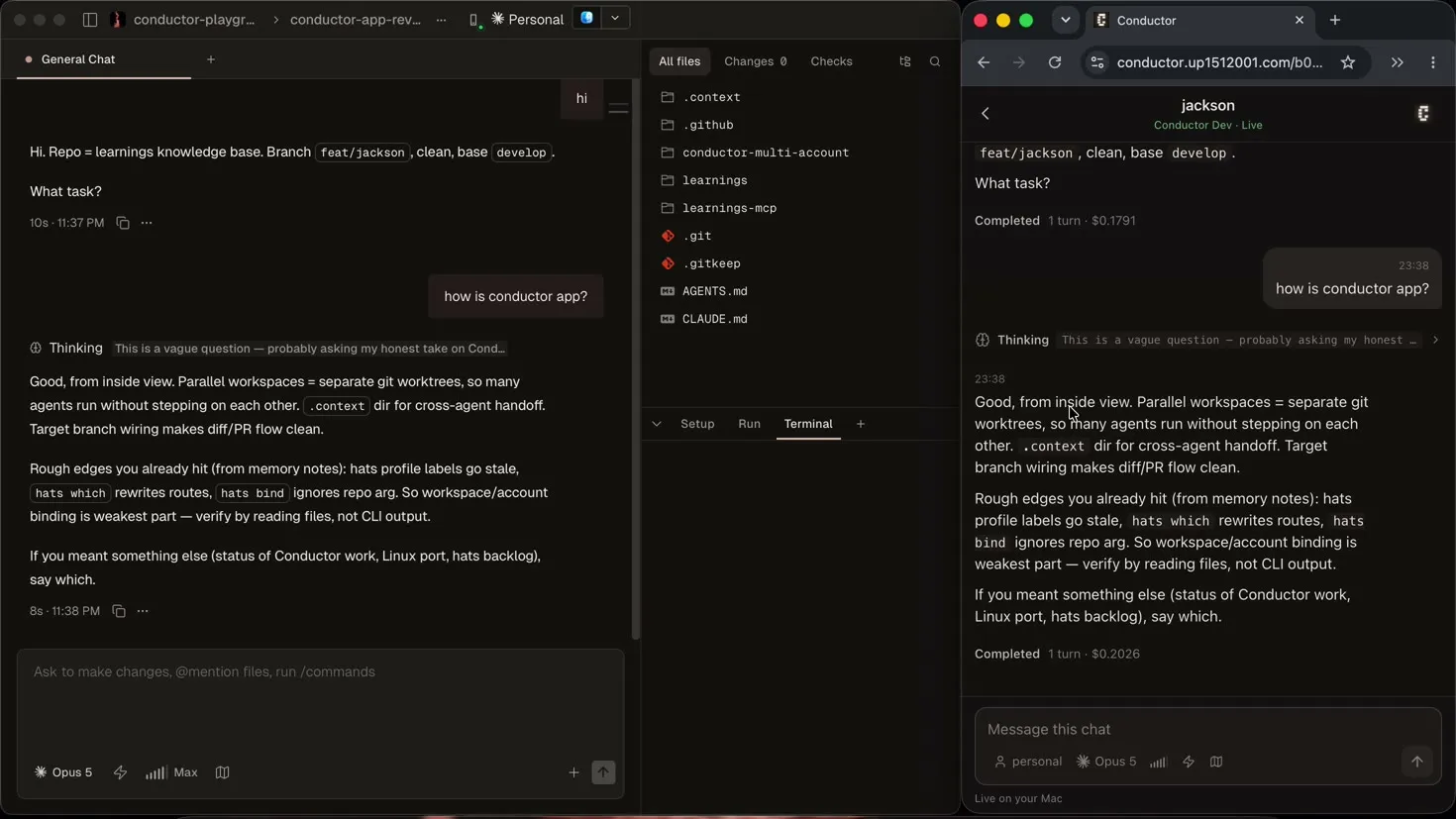
After getting per-chat agent accounts working inside Conductor, the next bottleneck was physical. Conductor runs on a Mac. If an agent is running a long refactor or working through a multi-step task, stepping away from the desk means leaving the loop blind until I get back to the machine.
What I wanted was a phone companion. Not a screen-sharing session over VNC, where you pinch and zoom across a 16-inch desktop on a 6-inch glass screen, and not a detached third-party bot. I wanted a dedicated mobile view that lets me monitor progress, answer questions, inspect tool calls, adjust thinking effort, switch models, and spawn new chats without being glued to my laptop.
The result is hats serve, built into conductor-hats. MIT licensed. This is how it works, what the constraints were, and what it took to build safely.
What it looks like
A button in Conductor’s toolbar opens a Mobile access panel. Click Create pairing code, and it gives you a QR code and a one-time link expiring in ten minutes.
Scan it or paste the link into a browser, and the mobile app loads. The top level mirrors Conductor’s mental model: Projects, Workspaces, and Chats. Open a chat, and an authenticated WebSocket begins streaming assistant responses, thinking blocks, and tool executions in real time. Reply from the phone, and the message enters Conductor’s real composer on the Mac, confirmed against the database before the phone marks it as sent.
The security boundary
The fastest way to expose a local service to a phone is also the worst: binding 0.0.0.0 and opening a port on your home router. That exposes your laptop to whoever scans the IP, breaks the moment you switch from Wi-Fi to cellular, and fails on corporate or guest networks.
hats serve uses a different path:
- Loopback only. The daemon binds strictly to
127.0.0.1:8787. - Outbound tunnel. A named Cloudflare Tunnel (
cloudflared) maintains an outbound TLS connection to Cloudflare’s edge, mapping a stable HTTPS hostname (conductor.up1512001.com) to the loopback port. No router port is opened, and no firewall rule is changed. Named tunnels are required; Quick Tunnels generate ephemeral hostnames and cannot provide the stable origin needed for secure cookies. - Fragment secrets. The pairing URL looks like
https://conductor.example.com/<path>#token=<secret>. Browsers never send the URL fragment across the network to proxies, CDN logs, or referrers. - Hardened cookies. The client exchanges the fragment token in an initial header for a 256-bit session cookie marked
Secure,HttpOnly, andSameSite=Strict. The WebSocket upgrade verifies this cookie, so no reusable secret ever appears in a socket URL. - Instant revocation. Clicking Stop mobile access or Revoke paired phones in Conductor rotates all pairing secrets, invalidates browser sessions, and disconnects live sockets immediately.
The unauthenticated HTML and JavaScript bundle contain zero Conductor data. If a connection drops, the client reconnects with bounded backoff and resubscribes to the active chat session.
Partial snapshots over the wire
Streaming agent runs to a phone can easily exhaust bandwidth if synchronization is naive.
Conductor stores chat data in SQLite. In my first prototype, change detection watched the write-ahead log revision. That was a mistake: any write by any agent in any workspace changed the WAL revision. If an agent in another window wrote a single log line, the server pushed the entire chat hierarchy and the full open transcript down the tunnel, measuring around 257 KB three times a second.
To fix that, state was split into three independent sections, each with its own revision stamp:
- The project and chat hierarchy
- The active chat transcript
- The agent and account catalog
Only sections whose revision changed are sent across the wire. If an unrelated workspace finishes a turn, the phone receives an 18 KB update for the chat list, while the transcript you are currently reading costs zero bytes. When a chat is idle, the database check is skipped entirely, so an open phone costs no database queries at all.
Measured on a 167-line transcript across 192 open chats:
| What changed | Before | After |
|---|---|---|
| Nothing visible, WAL churn only | 257 KB | Nothing sent |
| An unrelated workspace | 257 KB | 18 KB |
| The open chat, streaming | 257 KB | 53 KB |
Snapshots exceeding 4 KB are gzipped before transmission and decoded in the browser using DecompressionStream. Compression runs outward only (Mac to phone). The daemon never decompresses inbound frames, preventing compression bomb attacks from malicious clients.
The iron rule: never write to SQLite directly
When adding the ability to reply from a phone, the obvious path is writing directly into Conductor’s SQLite database. Run an INSERT into the message table, done.
That approach was rejected immediately. Conductor has no public local control API. Writing directly to internal SQLite tables couples your tool to private, undocumented schema and invariants, and risks race conditions with active agents.
Instead, hats enforces a clean boundary:
- Reads are read-only. The daemon reads transcripts and metadata directly from Conductor’s SQLite files using read-only connections.
- Writes use an injected lease queue. When you send a message from your phone, it is written to an owner-only queue file under
~/.conductor-accounts/. - The desktop panel types the message. The injected panel inside Conductor claims the queued item under a lease. It navigates Conductor to the exact workspace route, verifies that the laptop composer has no uncommitted draft, sets the input value via native DOM events, and clicks Conductor’s own send button.
- Readback verification. The phone keeps the message in a sending state until a read-only SQLite query confirms that a new user message with matching text has been recorded by Conductor itself.
If the send fails or Conductor refuses it, the draft text is restored to the phone composer alongside an error notice rather than being discarded.
Run controls belong at the composer
A phone client that only handles text input misses half the loop. When steering agents, you constantly need to adjust execution parameters before sending a prompt.
The mobile composer puts those controls right beside the input field:
- Thinking effort meter. Reasoning depth is a capability of the model, not the provider. Sonnet 4.6 stops at Max, Opus offers Ultracode, and Haiku has no effort control. The phone mirrors Conductor’s model registry and renders a visual meter filled to the active level.
- Live model switcher. The panel extracts Conductor’s live
visibleBuiltInModelIdswithout opening menus. Switching models mid-chat (such as selecting Opus 4.8 1M) triggers Conductor’s native model transition handler. - Account switcher. Changes the agent profile for the next start, keeping workspace context intact.
- New chat creation. Clicking ”+ new chat” uses Conductor’s visible action to spawn a fresh session in the workspace, with readback checks to prevent duplicate chat creation on network retries.
One Conductor copy, never a merged view
If you run both release Conductor and Conductor Dev on the same machine, they maintain separate databases. An unscoped daemon that combined databases would risk exposing private client projects or delivering actions to the wrong window.
Mobile access binds strictly to the database of the workspace that generated the pairing code. The daemon verifies the database source before answering any query, and refuses to merge or guess between multiple installations. Switching the pairing rotates all browser cookies and restarts the loopback listener for that specific instance.
The complete implementation is open source under MIT in conductor-hats.