I run Conductor with several agent accounts. A personal Claude subscription for my own projects, a work one for work. Both are paid for separately, both are mine to use, and switching between them was the most annoying part of my day.
Claude Code keeps one login per config directory. Conductor has one global setting for agent environment variables. Point that setting at a config directory and every workspace moves to that account. That is not switching, that is the same churn as signing out and back in, with extra steps.
What I wanted was an account per chat. Two chats open in one workspace, on two different accounts, answering at the same time.
That took about a week, and most of it was spent finding out what the app actually permits. The result is conductor-hats, MIT licensed. This is how it got there.
What it ended up as
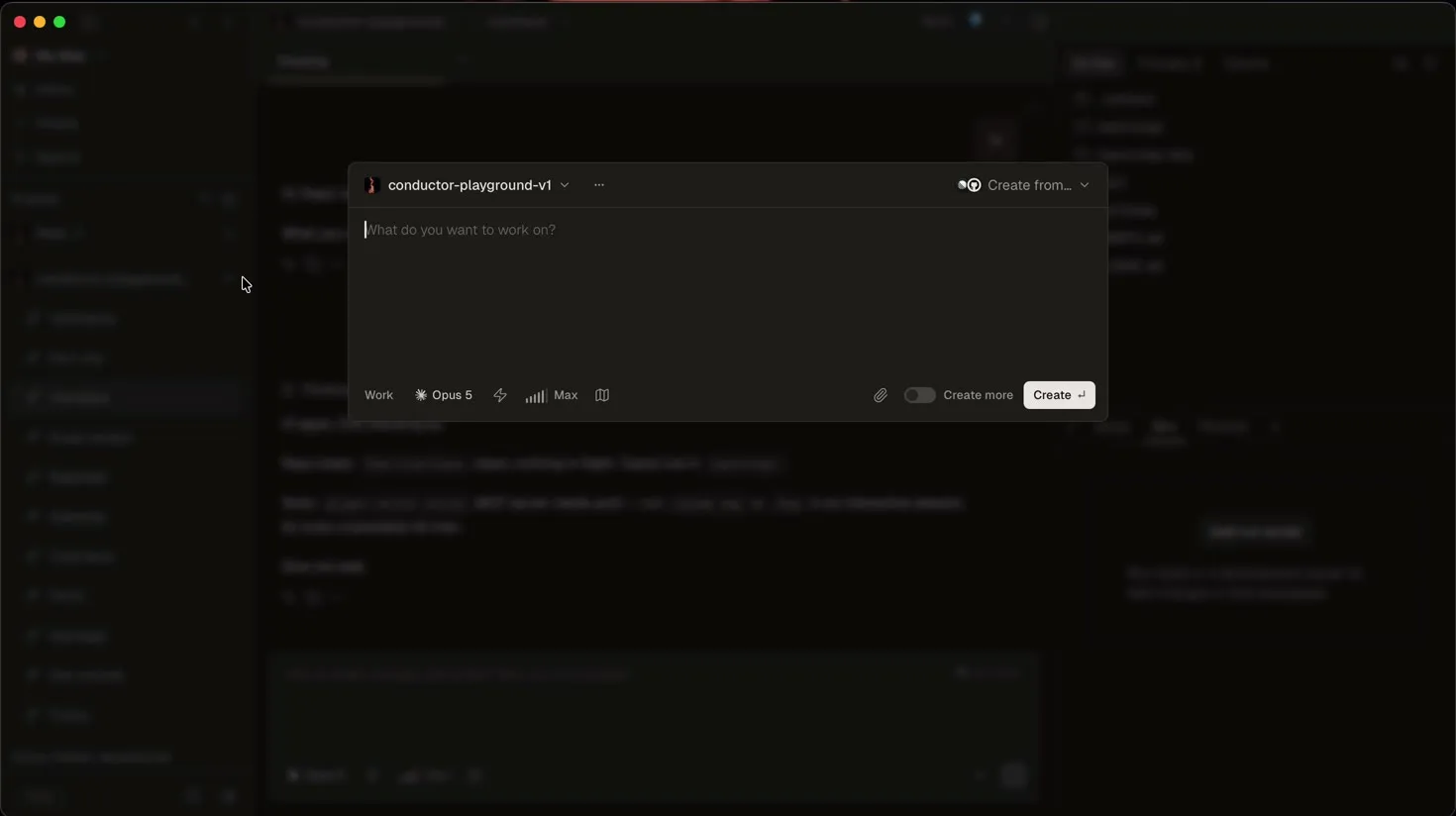
A button in Conductor’s toolbar, beside “Open in”, and a chip in the New Workspace composer. Click it, pick an account, that chat moves and the others stay where they are. Adding an account happens in the panel too: type a name, your browser opens for approval, paste the code back. No terminal at any point.
Getting a button into that toolbar is the part that was supposed to be impossible.
The first answer was no, and it was wrong
I started where you would start. Look in the app bundle for the frontend, edit it, done.
$ find /Applications/Conductor.app -type f \( -name '*.js' -o -name '*.html' -o -name '*.css' \)
$
Nothing. No JavaScript, no HTML, no CSS anywhere in the bundle. Conductor is Tauri, which compiles the frontend into the executable, so the whole UI lives inside a 66 MB Mach-O binary.
I wrote that up as “the frontend is out of reach” and moved on to the parts I could reach. That conclusion was wrong, and the mistake is worth naming: the first half is true, and the second half does not follow. “There is no file to edit” is not the same claim as “the assets cannot be reached”. I had proved the first and assumed the second.
The signature wall, which is real
Before the interesting part, the part that genuinely does not move.
$ codesign -dvvv /Applications/Conductor.app
Identifier=com.conductor.app
CodeDirectory v=20500 flags=0x10000(runtime)      # hardened runtime
Authority=Developer ID Application: <the vendor> (27XN666UJ7)
Notarization Ticket=stapled
Sealed Resources version=2 rules=13 files=14
The seal covers everything except Info.plist, PkgInfo and .DS_Store. There
is a Resources/conductor-skill/ directory that looks exactly like a plugin
folder, and it is writable, because you own /Applications. Writable and sealed
are different things:
$ echo '{}' > /tmp/Conductor.app/Contents/Resources/conductor-skill/.claude-plugin/extra.json
$ codesign --verify --strict /tmp/Conductor.app
/tmp/Conductor.app: a sealed resource is missing or invalid
One extra file, in the most plugin shaped directory in the bundle, and macOS rejects the app.
Re-signing makes codesign happy again and Gatekeeper still says no:
$ codesign -f -s - --deep --options runtime /tmp/Conductor.app
$ spctl -a -vvv -t exec /tmp/Conductor.app
/tmp/Conductor.app: rejected
Losing TeamIdentifier=27XN666UJ7 costs more than a Gatekeeper prompt. Keychain
items are access controlled by signing identity, so a re-signed copy of your
install cannot read Conductor’s own stored credentials. It signs you out of
Conductor.
That single fact decided the shape of the whole project, and I will come back to it.
Injecting a library is also out
The other obvious route into a running app is DYLD_INSERT_LIBRARIES. The
entitlements close it. Conductor ships exactly three:
com.apple.security.cs.allow-jit
com.apple.security.cs.allow-unsigned-executable-memory
com.apple.security.device.audio-input
Two are absent and both are required for that approach:
com.apple.security.cs.allow-dyld-environment-variables, without which the hardened runtime ignoresDYLD_INSERT_LIBRARIESentirely.com.apple.security.cs.disable-library-validation, without which any loaded library has to be signed by team27XN666UJ7.
So there is no way into a running Conductor from another process. That is a real wall and it stays up. Patching the bundle before it launches is a different mechanism, and that one works.
While I am here: writing my extension in Rust or Tauri would have changed none of this. A Tauri app you write is a separate process with its own window, exactly like a Swift or Electron app you write. Matching the host’s stack buys nothing. Patching the host’s assets buys everything. Those are unrelated facts and I had them tangled for a day.
What changed the answer
Tauri does not throw the frontend away, it stores it as an asset map inside
__DATA_CONST. Each entry is 32 bytes, (key_ptr, key_len, value_ptr, value_len), with plaintext keys and brotli compressed values. Once you know
that, you can walk it:
2878 assets, 36 MB of frontend, extracted from __DATA_CONST
assets/renderApp-CIIBeY95.js   8.6 MB   <- the New Workspace modal and the toolbar
Reading it is one thing. Writing it back is the question, because a bigger payload means moving pointers, and moving pointers inside a signed Mach-O is a different project entirely.
It turned out not to be necessary. Conductor ships that bundle compressed below brotli’s maximum:
original compressed   2,148,637 bytes
recompressed at q11   1,939,578 bytes   ->  ~209 KB of headroom
Recompress the modified bundle harder and it fits in the space the original
occupied. Only value_len changes in the map. No pointer is relocated, no
segment is resized. Then ad-hoc re-sign, which the copy already proved works.
That is the entire trick. Not clever, just measured. I spent a day assuming the write path was the hard part and about twenty minutes finding out it was not.
Two more things turned this from a proof of concept into something usable:
execute_shell_command is reachable. It is one of 48 Tauri commands the
webview can invoke, and window.__TAURI_INTERNALS__.invoke reaches it without
the invoke key. So injected UI can shell out to hats directly. The panel needs
no backend of its own and no state of its own.
Conductor flushes localStorage to local-storage.subsystem.*.json under
Application Support, so injected code has a persistence path if it needs one.
This project does not use it. hats owns all state, deliberately, so the panel,
the CLI and the slash command cannot disagree with each other.
Patch a copy, never your install
Back to the keychain problem. A re-signed Conductor cannot read Conductor’s credentials, so patching the app you rely on signs you out of it.
So hats dev-app builds a copy with its own bundle identifier, its own database
and its own keychain items. Both apps run at the same time. hats patch refuses
/Applications/Conductor.app unless you pass --i-know.
hats dev-app     # an isolated copy, safe to modify
hats patch       # inject the panel into it
hats repatch     # both again, after a Conductor update
The cost is stated rather than buried, because it is not small: the copy is not
notarized, and every Conductor release ships a new bundle and undoes the patch.
That is why /account exists alongside as a plain slash command. It survives
updates, needs no patching, and does the same routing. It is not the interesting
part, anyone can write a slash command, but it is the part that keeps working
while you are waiting to re-patch.
The routing half, which needed no patching at all
The panel is the visible half. The half that actually moves accounts around is older and duller and uses only documented settings.
Claude Code derives its keychain service name from the config directory:
function keychainService(suffix = "") {
  let r = process.env.CLAUDE_SECURESTORAGE_CONFIG_DIR,
      isDefault = r !== undefined ? !r : !process.env.CLAUDE_CONFIG_DIR,
      dir = r !== undefined ? r.normalize("NFC") : homedir(),
      tag = isDefault ? "" : "-" + sha256(dir).hex().slice(0, 8);
  return `Claude Code${OAUTH_FILE_SUFFIX}${suffix}${tag}`;
}
So CLAUDE_CONFIG_DIR=~/.conductor-accounts/claude/work gets its own keychain
item and its own login. This is Anthropic’s own mechanism for multiple accounts,
not a workaround. Codex has the equivalent in CODEX_HOME.
CLAUDE_CODE_OAUTH_TOKEN looks like a lighter switch and is a trap. On macOS the
claude binary strips it from the environment it hands to its background spare
host, so warm starts fall back to the default account without saying anything.
That one cost an afternoon of “it works, sometimes”.
Conductor gives two keys to aim this with, both in its published settings schema:
claude_code_executable_path = "/path/to/claude-router"

[environment_variables]
CLAUDE_CONFIG_DIR = "/Users/you/.conductor-accounts/claude/work"
claude_code_executable_path is the useful one. Conductor drives
@anthropic-ai/claude-agent-sdk, which spawns the binary like this:
let isNative = ![".js",".mjs",".tsx",".ts",".jsx"].some(r => path.endsWith(r));
spawn(isNative ? path : "node", …, { cwd: workspaceDir, env, signal });
Any executable whose path does not end in a JavaScript extension is exec’d
directly with claude’s argv. A #!/bin/sh script qualifies. That is the whole
trick behind the router: Conductor thinks it is running claude, and it is, one
exec later, with a different CLAUDE_CONFIG_DIR.
The router has to exec rather than fork or daemonize. Conductor’s stdio pipes
assume a direct child and the claude binary’s spare host has the same
expectation. Get that wrong and the chat hangs with no error.
Why POSIX shell
The router sits in front of every agent Conductor starts. A bug in it is not a bad feature, it is an outage: no agent starts at all.
So all the decision making happens inside one command substitution:
DECISION=$(
    [ -r "$LIB" ] || exit 0
    . "$LIB"
    …
) 2>/dev/null
A syntax error or a missing library kills that subshell and leaves DECISION
empty. The router then falls back through the bundled binary path and
command -v claude, and execs whatever it finds. You lose the account routing
and you keep your agent. Two tests cover exactly that.
Shell also means no runtime to install, nothing to keep up to date, and a dependency list of zero on the one component that cannot be allowed to fail.
Why the account is per chat and not per message
One SDK query() per session, with user messages fed into a long lived async
generator. The claude process stays alive across turns, so its environment is
fixed when the generator starts.
A conversation that is already running therefore cannot change account. It took
one when it spawned and never reads another. Rather than pretend otherwise, the
panel names the account the conversation is on and, separately, the one it will
come up on next time. The router records what it actually handed each agent,
under sessions/<agent>/started/<session>, because “what this chat is running
on” and “what this chat is set to” are two different facts and conflating them
is how you get a UI that lies.
The three bugs that cost the most
The panel needed two or three clicks to open. Conductor re-renders its
toolbar constantly, and when React replaces the container the injected button
goes with it. A rebuild landing between mousedown and mouseup means the
browser fires no click at all. It now opens on pointerdown, a single event
that cannot be split that way, which is also how native menus behave.
Every render pass cost a process spawn. The label refresh ran from the
mutation observer, and each refresh shelled out to hats json. During a
streaming chat that was several spawns a second, and a real click then queued
behind the backlog. Now there is one in flight read shared by all callers, a four
second cache, invalidated on every write, and a slow timer keeping labels fresh
instead of the observer.
Conductor 0.82 painted an empty window. App launches, signature valid,
nothing logged. Not the panel: a copy with the panel left out was equally blank.
0.82 renders its UI only after a client version check settles, and in a re-signed
copy that check never settles, so the gate renders nothing, permanently. hats patch now injects a small boot guard that answers that one request with an
error, which Conductor already handles by logging and carrying on. The cost, said
out loud: a patched copy does not enforce Conductor’s minimum client version.
One choice that has paid for itself repeatedly: the panel finds its anchors by product copy, not by class name. Class names are hashed per build. “The control whose tooltip says Open in” and “the field whose placeholder says What do you want to work on” survive releases that rename every identifier. When an anchor does move, the control fails to appear rather than taking the app down.
What I tried and threw away
Interposing on the sidecar socket. Conductor’s Tauri process talks to
conductor-runtime over a unix socket, NDJSON, zod validated, around 25 message
types. Total control, entirely undocumented, and it would break on every
release.
Writing claude_env_vars into Conductor’s SQLite database. It works. It is
also global: the settings table is (key, value) with no scope column, so one
value applies to all of Conductor. That is the exact churn this project exists to
remove. Writing into another application’s database is not something I want to
ship regardless.
A local proxy on ANTHROPIC_BASE_URL, rewriting the Authorization header
per request. This is the only design that gives genuinely per request switching,
and it is a supported environment variable. It also means holding long lived
credentials in a process of my own and terminating requests to Anthropic through
it. Per workspace is enough when workspaces are the unit of work, and that
tradeoff is not close.
What I actually got
Two chats in one workspace, on two accounts, answering at the same time. No
signing in and out, ever. Skills, plugins, commands and transcripts stay shared
across all of them, because each profile symlinks projects, skills,
plugins, commands, agents, settings.json and CLAUDE.md back to
~/.claude. Only credentials and .claude.json are per account, which means
--resume keeps working when a workspace changes account.
The wider thing I got is a method, and it is the part that transfers. Every hard
“no” in this project was a specific, testable claim, and the two that held did so
for reasons I could point at: the code signature seal, and two missing
entitlements. The one that did not hold was the one I had never actually tested,
only inferred. find returning nothing is evidence about file layout. I read it
as evidence about reachability.
So: write the claim down, then try to break it. The commands in this post are in the repo for exactly that reason. Anyone can run them and tell me where I am wrong.
What I would rather have
A per workspace account selector, in Conductor, shipped by Conductor. Everything in that repository becomes unnecessary the day they ship one, which is the right outcome and one I would be glad to see. If you want it too, it is Help, then Send Feedback, asking for per workspace agent account selection.
The code is at
github.com/up1512001/conductor-hats.
docs/patching-conductor.md has the evidence for every claim above, including
the ones that say no.
One thing that is not up for interpretation: using several subscriptions to get around rate limits is against Anthropic’s usage policy. Choosing between a personal account and a work account that are separately paid for is not. This is built for the second case, and that is the only case I use it for.