Halfway through November, every workflow in my main repository just stopped. They didn’t fail, they never started. Each job sat in the queue with the same message: “The job was not started because recent account payments have failed or your spending limit needs to be increased.”
That repository is a TypeScript monorepo with around 4,000 tests, three Cloudflare deploys and a handful of scheduled reports. It sits in a GitHub organisation on the Free plan, which comes with 2,000 Linux minutes a month. By the 16th I’d used 2,042. Going past the free minutes needs a card that works, mine didn’t, and so GitHub stopped running anything, deploys included.
The annoying part is that it was the second time. A month before, I’d moved everything to one of the faster hosted runner services to save minutes. That ended the same way, with jobs refused over billing, plus a $25 bill on top.
Meanwhile I had an old laptop at home that was already on day and night, running some long data jobs. So I thought, why not let it run the CI as well? This is how that went, how I made it safe enough that I stopped worrying about it, and what it took to make CI on a laptop not painfully slow.
The numbers first
Before changing anything I wanted real numbers. Forty nine days of history came to 7,664 minutes, which is about 3,300 a month, and it was heading towards 3,800. Past the free 2,000, GitHub charges $0.006 a minute.
| Option | A month | The catch |
|---|---|---|
| GitHub hosted | about $11 | A card that never fails |
| Faster hosted runners | less | One more card that can block me |
| A small VPS | a fixed fee | More to patch and secure |
| The old laptop | $0 | Memory, and making it safe |
The total wasn’t even the interesting bit. Every release was running the full 4,000 test check four times on the same commit, once in CI and once more in each of the three deploy workflows. That was wasteful on GitHub, and on a slower machine it would hurt a lot more.
Why self-hosted runners make people nervous
GitHub’s own docs warn you about self-hosted runners, and fair enough. A normal runner is a long running process on your machine. Every job runs as the same user, in the same folders, with the same home directory. So if one job pulls in a bad dependency, it can leave something behind for the next job: a changed binary, a poisoned cache, or a process sitting quietly in the background waiting for a deploy token to show up a few jobs later.
On a laptop at home there’s more to lose than the runner. It’s on the same network as everything else in the house. It already runs other work that I care about. And if a job eats all the memory, the whole thing freezes. That had already happened to me once on this machine, and I really didn’t want to walk over and hard reboot it again.
So I wrote down three rules before writing any code. Nothing a job does should outlive the job. A job shouldn’t be able to see the laptop’s files, its network or its other work. And no job should be able to take the laptop down.
How it works
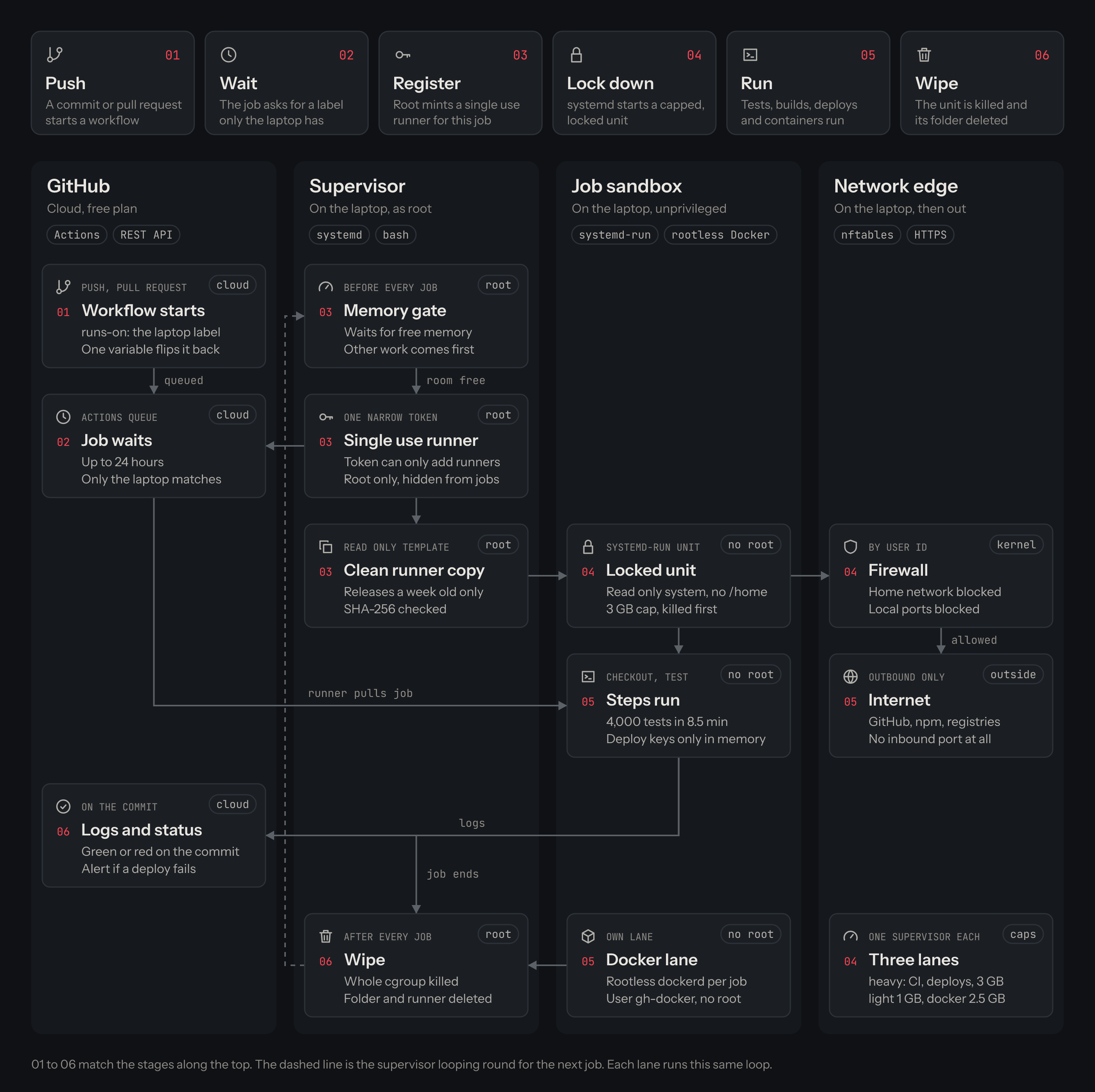
There are five pieces, and each one is there to keep one of those rules.
A brand new runner for every job
The laptop doesn’t have a registered runner sitting around waiting. Instead there’s a small supervisor, a systemd service running as root, that loops forever. Each time round, it asks GitHub for a just in time runner, which is a registration that’s only good for a single job:
response=$(api -X POST "$API/orgs/$ORG/actions/runners/generate-jitconfig" \
  -d "{\"name\":\"$LABEL-$(date +%s)\",\"runner_group_id\":1,\"labels\":[\"$LABEL\"],\"work_folder\":\"_work\"}")
It copies a clean runner from a read only template into an empty folder, runs it for exactly one job, and then deletes the folder and the registration. The runner itself only gets updated to a GitHub release once that release is at least a week old, and the download has to match the SHA-256 in the release notes before it’s unpacked.
The token that creates these runners has exactly one permission, Self-hosted runners on the organisation, and no access to any repository. It can add and remove runners and that’s it. It can’t read code, change settings or delete anything. It sits in a file that only root can read, somewhere no job can reach.
systemd as the sandbox
Every job runs as its own short lived systemd unit, started with systemd-run, as a user with no password, no shell, no sudo and no Docker access. The unit settings are where the walls go up:
ProtectSystem=strict        # the whole system is read only
ReadWritePaths=/srv/gh-runner/job-heavy
ProtectHome=yes             # /home simply isn't there
PrivateTmp=yes
ProtectProc=invisible       # can't see anyone else's processes
NoNewPrivileges=yes
CapabilityBoundingSet=
MemoryHigh=2560M            # slowed down here
MemoryMax=3G                # killed here
OOMScoreAdjust=1000         # and killed first if memory runs short
CPUAffinity=0-3
KillMode=control-group
The line I care about most is KillMode=control-group. When a job ends, systemd kills every process in that unit, even ones that tried to slip away into the background, and then the supervisor deletes the folder. The next job starts from an empty directory with a fresh home.
Before it starts a job, the supervisor also waits until there’s enough free memory, so the work that was already running on the laptop comes first. If the laptop is busy, CI gets a bit slower. I’d much rather that than the other way round.
A firewall that knows who’s talking
Jobs need the internet for GitHub, npm and container registries. They don’t need my router, my printer or anything listening on the laptop itself. nftables can match on which user sent a packet, so the rule ends up pretty short:
table inet ci_runner {
  chain output {
    type filter hook output priority filter; policy accept;
    meta skuid "gh-runner" jump job
    meta skuid "gh-docker" jump job
  }
  chain job {
    oifname "lo" udp dport 53 accept
    oifname "lo" tcp dport { 0-1023, 3306, 5432, 6379, 40000-40100 } reject
    ip daddr { 10.0.0.0/8, 172.16.0.0/12, 192.168.0.0/16, 169.254.0.0/16 } reject
  }
}
Nothing is opened for incoming traffic. The runner only ever calls out to GitHub, so it works behind a normal home router without any port forwarding.
Three lanes, so reports don’t wait behind CI
With one job at a time, a report that takes five seconds had to wait for a whole test run to finish. So the laptop now runs three supervisors from the same template, each with its own label, cores and memory limit:
| Lane | Runs | Cores | Memory |
|---|---|---|---|
| heavy | CI and deploys | 4 | 3 GB |
| light | reports and log jobs | 1 | 1 GB |
| docker | the two workflows that need Docker | 3 | 2.5 GB |
Docker without giving away root
Two of my workflows build and run a ClamAV container image. The usual shortcut is to add the runner user to the docker group, but on Linux that’s basically root with extra steps. So the docker lane starts a rootless Docker daemon inside the job itself, as a separate user with no special rights and its own range of user ids. Images, layers and containers all live in the job folder, so they get deleted with the job like everything else. It uses Docker’s official static release, pinned to a version and a checksum, in its own folder, so the Docker I already had installed on the laptop is never touched.
Every workflow picks its lane with one line, which also gives me a way out:
runs-on: ${{ vars.RUNNER == 'github' && 'ubuntu-24.04' || 'laptop' }}If the laptop is off, I set one repository variable and every job goes back to GitHub’s runners.
What broke along the way
Each of these cost me a failed run, and in every case the sandbox was doing exactly what I’d told it to.
RestrictSUIDSGIDbroketar. The very first job failed while unpackingactions/checkout, with “Function not implemented”. Newer versions of GNU tar use a system call calledopenat2, and that systemd setting blocks it because it can’t inspect its arguments.NoNewPrivilegesalready covers what it was protecting, so I dropped it.ProtectKernelLogsandProtectKernelModulesbroke containers. Rootless Docker failed witherror mounting "proc" to rootfs. Linux won’t mount a fresh/procinside a container if parts of the outer one are hidden, and those two settings hide a few bits. The docker lane now blocks the same things with a system call filter instead.- Rootless Docker went looking for a desktop login. It assumed it was running inside a normal user session and looked for
user.slice/user-996.slice, which doesn’t exist for a system service. Adding--exec-opt native.cgroupdriver=cgroupfsfixed it, and the job’s own memory and CPU limits still cover every container. - Updating the setup could kill a deploy halfway. Reinstalling restarted the supervisors, and a supervisor cleans up old jobs when it starts, including one that was still running. Now the installer stops new jobs first, waits until nothing is running, and only then swaps things over.
Making CI on a laptop fast
The first green run on the laptop took 24 minutes. On GitHub it used to take about 4. Throwing hardware at it wasn’t an option, so I went looking for waste.
| Change | What it did |
|---|---|
| Deploys reuse CI’s result | Tests run once per release, not four |
| Cancel replaced CI runs | No time on commits nobody ships |
| Skip the package cache | Install in 23 s instead of nearly 2 min |
| Server tests share modules | 226 s down to 85 to 100 s |
| Four cores instead of three | Tests 504 s down to 385 s |
The cache one surprised me. I’d assumed the cache was always the faster path, but pulling 176 MB from GitHub’s cache to a machine at home took almost two minutes, while installing everything straight from npm took 23 seconds.
The test change needs a bit more explanation. By default Vitest isolates every test file, so each worker loads the same modules again and again, once per file, and 45 percent of the run was going into exactly that. Turning isolation off for the server tests made them about three times faster, and they passed three runs in random order. The four test files that use vi.mock really do need a fresh start, so the config finds them by reading their source and keeps just those isolated:
const mocksModules = (file: string): boolean =>
  /\bvi\.(?:doMock|mock)\(/u.test(readFileSync(`${root}${file}`, "utf8"));
const isolatedTests = nodeTests
  .flatMap((pattern) => globSync(pattern, { cwd: root }))
  .filter(mocksModules);
I left the browser tests isolated. When I ran them in random order, five of them quietly depended on starting fresh, and flaky tests cost far more time than they ever save. I also tried Vitest’s on disk transform cache, and it made no difference at all, 306 seconds with an empty cache and 315 with a full one, because the time goes into running modules, not transforming them.
CI now takes 8.5 to 9.6 minutes, depending on how busy the laptop is with its other work.
What I gave up
It’s slower than GitHub’s runners and it always will be. If the laptop is off, jobs sit in the queue for up to a day unless I flip that variable. And whenever I change the runner setup, I have to run the installer on the laptop with sudo myself, because nothing else there has root.
What I got back is a CI bill that was heading for $11 a month, and a billing problem that had stopped my deploys twice, both gone, on a machine I already owned. The part I didn’t expect is that in some ways a job is more locked down here than on a hosted runner, where it gets passwordless sudo and an open network. Here it gets neither. Every job starts from nothing, sees only what it needs, and leaves nothing behind.